


In the world of online communication, emojis have become a language of their own. They add depth, emotion, and context to our text-based conversations. Discord, a popular platform for communities, gamers, and friends, has embraced emojis as an essential part of its interface. However, understanding and managing Discord emojis size can be a challenge, especially for server owners and administrators. In this comprehensive guide, we will delve into everything you need to know about Discord emojis size, from creation to usage, to ensure your server’s emotes look their best.
The Basics of Discord Emojis

Before we dive into the intricacies of sizing Discord emojis, let’s cover the basics:
Emote vs. Emoji:
- Emoji: These are the standard, universally recognized small images that express emotions, objects, or symbols, such as 😃, 🍔, or 🚀.
- Emote: Emotes, on the other hand, are custom emojis created by Discord server members or administrators. They can be anything from a server’s logo to inside jokes.
Emote Categories:
- Default Emojis: These are the emojis available to all Discord users on any server. They are the standard emojis you find on most platforms.
- Server Emojis: Custom emojis created by server administrators or members, exclusive to that server.
Emote Sizes:
- Standard Size: Discord emojis typically display at 32×32 pixels when sent without any modifications.
- Big Emoji Size: Discord Nitro users can use emojis up to 128×128 pixels in size.
Now that we’ve clarified the terminology, let’s explore Discord emojis size in more detail.
Creating Discord Emojis
Before you can consider the size of your Discord emojis, you need to create them. Discord has specific requirements for emoji creation:
File Format:
- Emojis must be in PNG format.
- The file size must not exceed 256KB.
Size and Dimensions:
- Emojis should ideally be created in a square aspect ratio for the best display.
- The recommended size for creating standard emojis is 128×128 pixels.
- Emojis that will be used as stickers should be created at 256×256 pixels.
Transparent Background:
- Emojis should have a transparent background. This allows them to seamlessly integrate into chat conversations without a white or colored square surrounding them.
Discord Emojis Size: Standard vs. Big Emojis
Discord offers two primary sizes for emojis, each with its specific use case:
Standard Emojis:
- Size: 32×32 pixels
- Usage: Standard emojis are the default size for emojis sent in chat messages on Discord servers.
- Accessibility: All Discord users, regardless of their Nitro status, can use standard emojis.
Big Emojis:
- Size: Up to 128×128 pixels
- Usage: Big emojis are a feature of Discord Nitro, a premium subscription service. Nitro users can send and use big emojis, which are four times larger than standard emojis.
- Enhanced Expression: Big emojis allow for more detailed and expressive emotes, making them ideal for reactions and emphasizing points in conversations.
- Emote Servers: Some servers may have specific channels or emote categories dedicated to big emojis to enhance user engagement and expression.
Uploading and Managing Discord Emojis
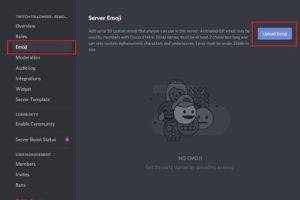
Once you have created your Discord emojis with the appropriate size and format, you need to upload and manage them within your server:
Server Settings:
- Access your server settings: Click on your server name, then select “Server Settings.”
Emoji Management:
- Uploading Emojis: In the “Server Settings” menu, choose “Emoji.” Here, you can upload new emojis and manage existing ones.
- Naming Emojis: Give your emojis clear and concise names, as these names will be used in emoji shortcuts. For example, if you name an emoji “:banana,” users can type “:banana” to use it in chat.
Emoji Permissions:
- Customize Emoji Permissions: Server administrators can manage who can use, upload, or manage emojis. Customizing these permissions ensures proper moderation and control over your server’s emoji usage.
Perfecting Discord Emojis Size
To ensure your Discord emojis look their best and maintain their clarity, follow these guidelines:
Keep It Square:
- Create your emojis in a square aspect ratio, such as 128×128 pixels. Square emojis appear well-balanced and aesthetically pleasing.
Mind the Details:
- Be mindful of the level of detail in your emojis. While big emojis allow for more intricate designs, remember that users will often view them at the standard size. Ensure that your emojis are recognizable and clear even at 32×32 pixels.
Test on Various Devices:
- Emojis may display differently on various devices and screen sizes. Test your emojis on multiple devices and platforms to ensure they maintain their quality and readability.
Transparency Matters:
- Emojis should have a transparent background to blend seamlessly into Discord chats. A transparent background ensures that the emoji is the center of attention, without any distracting elements.
Nitro-Exclusive Design:
- If you plan to create big emojis, consider designing them with Nitro users in mind. Take advantage of the larger canvas to add more detail and nuance to your emotes.
Using Emojis Effectively on Discord

Discord emojis are not just decorative; they enhance communication and express emotions. Here are some tips on using emojis effectively:
Enhance Expression:
- Emojis can help convey tone and emotion in text-based communication. Use them to emphasize feelings, whether it’s laughter 😂, surprise 😮, or sadness 😢.
React and Engage:
- React to messages with emojis to acknowledge or express your response. Discord allows users to react to messages with a wide range of emojis, adding interactivity to conversations.
Create Reaction Roles:
- In some servers, emojis are used to assign roles or tags to users based on their reactions. This can be useful for categorizing members or granting access to specific channels.
Organize Emote Servers:
- Consider creating dedicated channels or categories for emotes, especially if your server has a substantial collection. Organized emote servers make it easier for users to find and use their favorite emojis.
Handling Emote Servers
For larger servers, emote servers or emoji categories can become a crucial aspect of user engagement and expression. Here are some considerations:
Emote Servers:
- Designate specific channels or servers for emojis, especially if your server has numerous custom emojis.
- Organize emote servers based on themes, types of emojis, or user preferences.
Nitro Boost Perks:
- Nitro Boosting a server provides additional perks, such as the ability to upload more emojis. Consider these perks when planning your server’s emoji strategy.
Moderation:
- Ensure that emote servers are moderated effectively to prevent misuse or spamming of emojis.
Also Read:
Decoding the Orange Emoji: Its Many Meanings and Symbolisms
Safety Rankings: Exploring the Top 7 Countries with the Lowest Crime Rates
Understanding the Significance of Ratios: 5 Common Flag Ratios Revealed
Discord emojis are a vibrant and dynamic part of the platform’s culture. Understanding Discord emojis size, creation, and usage is essential for both server administrators and regular users. Whether you’re designing emojis to express your server’s unique identity or simply using them to enhance your conversations, the size and quality of your emojis play a significant role in effective communication.
By following the guidelines for creating, managing, and using Discord emojis, you can create an engaging and expressive environment within your Discord server. Emojis are not just images; they are a language that transcends words, enabling users to express themselves, react to messages, and build a sense of community in the virtual world of Discord.
